Multi-level headers in a table
Sometimes a hierarchical data structure should be shown in a table. Let's build a table with diffrent techniques and check which one is simpler to read with a screen reader.
Data structure and the problem
Let's take countries and regions together with the population.
Region/Country
Population
Europe
742 million
Western Europe
200 million
Austria
9 million
France
68 million
Switzerland
9 million
Central and Eastern Europe
285 million
Czeh Republic
11 million
Hungary
10 million
Romania
19 million
America
1.02 billion
North America
592 million
Canada
41 million
Mexico
130 million
United States
335 million
There are two challenges in this data structure.
Pair regions and countries to each other.
Each region has a population information as well as the countries.
Table with irregular headers
<table >
<caption > Population of regions and countries</caption >
<thead >
<tr >
<th scope ="col" > Region Group</th >
<th scope ="col" > Region</th >
<th scope ="col" > Country</th >
<th scope ="col" > Population</th >
</tr >
</thead >
<tbody >
<tr >
<th rowspan ="9" scope ="rowgroup" > Europe</th >
<td > </td >
<td > </td >
<td > 742 million</td >
</tr >
<tr >
<th rowspan ="4" scope ="rowgroup" > Western
Europe</th >
<td > </td >
<td > 200 million</td >
</tr >
<tr >
<th scope ="row" > Austria</th >
<td > 9 million</td >
</tr >
<tr >
<th scope ="row" > France</span >
</th >
<td > 68 million</td >
</tr >
<tr >
<th scope ="row" > Switzerland</th >
<td > 9 million</td >
</tr >
<tr >
<th rowspan ="4" scope ="rowgroup" > Central
and Eastern
Europe</th >
<td > </td >
<td > 285 million</td >
</tr >
<tr >
<th scope ="row" > Czeh
Republic</th >
<td > 11 million</td >
</tr >
<tr >
<th scope ="row" > Hungary</th >
<td > 10 million</td >
</tr >
<tr >
<th scope ="row" > Romania</th >
<td > 19 million</td >
</tr >
<tr >
<th rowspan ="5" scope ="rowgroup" > America</th >
<td > </td >
<td > </td >
<td > 1.02 billion</td >
</tr >
<tr >
<th rowspan ="4" scope ="rowgroup" > North
America</th >
<td > </td >
<td > 592 million</td >
</tr >
<tr >
<th scope ="row" > Canada</span >
</th >
<td > 41 million</td >
</tr >
<tr >
<th scope ="row" > Mexico</span >
</th >
<td > 130 million</td >
</tr >
<tr >
<th scope ="row" > United
States</th >
<td > 335 million</td >
</tr >
</tbody >
</table > table {
border-collapse : collapse;
}
td ,
th {
border : 1px solid;
padding : 4px 8px ;
}
th {
text-align : left;
vertical-align : top;
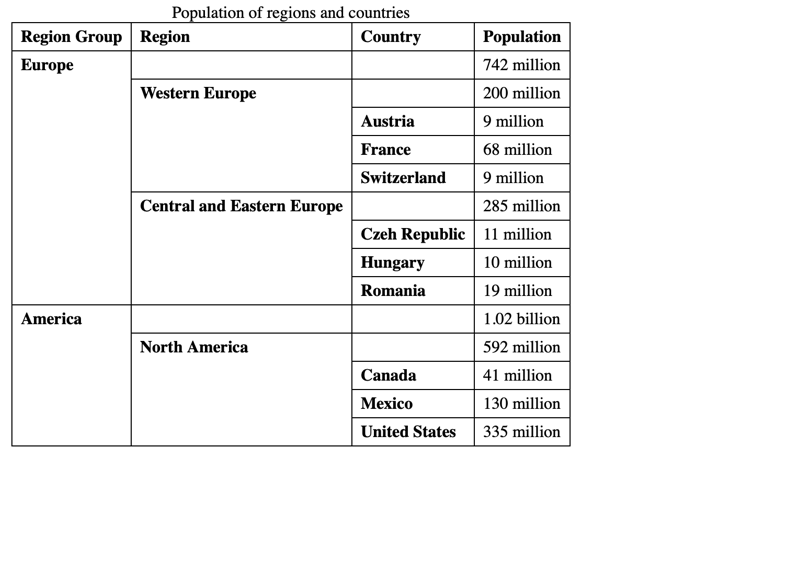
}Irregular headers are using rowspan attribute on th elements to span multiple rows.
The data is better structured visually but there are more columns and empty cells are produced.
The current level is known only because it starts with the column which is the first one in that row when entering a row.
Table with more headers
<table >
<caption > Population of regions and countries</caption >
<thead >
<tr >
<th id ="header-1" scope ="col" > Region/Country</th >
<th id ="header-2" scope ="col" > Population</th >
</tr >
</thead >
<tbody >
<tr >
<th id ="data-1-header" scope ="row" > Europe</th >
<td > 742 million</td >
</tr >
<tr >
<th id ="data-1-1-header" headers ="header-1 data-1-header" scope ="row" > <span class ="name" > <span class ="white-space"
aria-hidden ="true" > </span > Western
Europe</span > </th >
<td > 200 million</td >
</tr >
<tr >
<th headers ="header-1 data-1-header data-1-1-header" scope ="row" > <span class ="name" > <span class ="white-space"
aria-hidden ="true" > </span > <span class ="white-space" aria-hidden ="true" > </span > Austria</span > </th >
<td headers ="header-2 data-1-header data-1-1-header" > 9 million</td >
</tr >
<tr >
<th headers ="header-1 data-1-header data-1-1-header" scope ="row" > <span class ="name" > <span class ="white-space"
aria-hidden ="true" > </span > <span class ="white-space" aria-hidden ="true" > </span > France</span >
</th >
<td headers ="header-2 data-1-header data-1-1-header" > 68 million</td >
</tr >
<tr >
<th headers ="header-1 data-1-header data-1-1-header" scope ="row" > <span class ="name" > <span class ="white-space"
aria-hidden ="true" > </span > <span class ="white-space" aria-hidden ="true" > </span > Switzerland</span > </th >
<td headers ="header-2 data-1-header data-1-1-header" > 9 million</td >
</tr >
<tr >
<th id ="data-1-2-header" headers ="header-1 data-1-header" scope ="row" > <span class ="name" > <span class ="white-space"
aria-hidden ="true" > </span > Central
and Eastern
Europe</span > </th >
<td > 285 million</td >
</tr >
<tr >
<th headers ="header-1 data-1-header data-1-2-header" scope ="row" > <span class ="name" > <span class ="white-space"
aria-hidden ="true" > </span > <span class ="white-space" aria-hidden ="true" > </span > Czeh
Republic</span > </th >
<td headers ="header-2 data-1-header data-1-2-header" > 11 million</td >
</tr >
<tr >
<th headers ="header-1 data-1-header data-1-2-header" scope ="row" > <span class ="name" > <span class ="white-space"
aria-hidden ="true" > </span > <span class ="white-space" aria-hidden ="true" > </span > Hungary</span > </th >
<td headers ="header-2 data-1-header data-1-2-header" > 10 million</td >
</tr >
<tr >
<th headers ="header-1 data-1-header data-1-2-header" scope ="row" > <span class ="name" > <span class ="white-space"
aria-hidden ="true" > </span > <span class ="white-space" aria-hidden ="true" > </span > Romania</span > </th >
<td headers ="header-2 data-1-header data-1-2-header" > 19 million</td >
</tr >
<tr >
<th id ="data-2-header" scope ="row" > America</th >
<td > 1.02 billion</td >
</tr >
<tr >
<th id ="data-2-1-header" headers ="header-1 data-2-header" scope ="row" > <span class ="name" > <span class ="white-space"
aria-hidden ="true" > </span > North
America</span > </th >
<td > 592 million</td >
</tr >
<tr >
<th headers ="header-1 data-2-header data-2-1-header" scope ="row" > <span class ="name" > <span class ="white-space"
aria-hidden ="true" > </span > <span class ="white-space" aria-hidden ="true" > </span > Canada</span >
</th >
<td headers ="header-2 data-2-header data-2-1-header" > 41 million</td >
</tr >
<tr >
<th headers ="header-1 data-2-header data-2-1-header" scope ="row" > <span class ="name" > <span class ="white-space"
aria-hidden ="true" > </span > <span class ="white-space" aria-hidden ="true" > </span > Mexico</span >
</th >
<td headers ="header-2 data-2-header data-2-1-header" > 130 million</td >
</tr >
<tr >
<th headers ="header-1 data-2-header data-2-1-header" scope ="row" > <span class ="name" > <span class ="white-space"
aria-hidden ="true" > </span > <span class ="white-space" aria-hidden ="true" > </span > United
States</span > </th >
<td headers ="header-2 data-2-header data-2-1-header" > 335 million</td >
</tr >
</tbody >
</table > table {
border-collapse : collapse;
}
td ,
th {
border : 1px solid;
padding : 4px 8px ;
}
th {
text-align : left;
}
.name {
display : flex;
}
.name .white-space {
padding-left : 8px ;
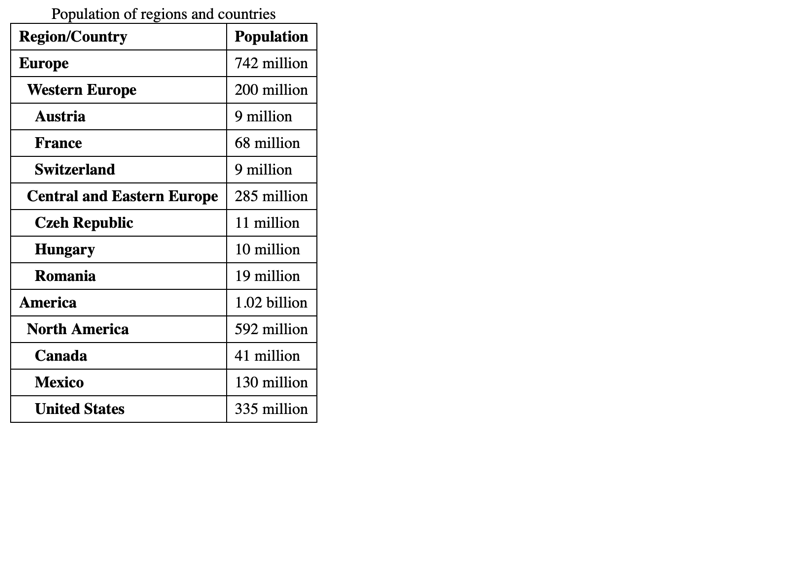
}Multi-lelve headers are using id and headers attributes on th and td elements to connect them to each other.
Additional CSS indentation is used in each region/country cell to visualize the current level.
The table reamins simple, there is no empty cell but it is complex to implement because of many header IDs.
It is similar to follow the current level like in the Irregular headers example. All the connected header cells are mentioned for the first cell of a row when the level is changed (screen readers could be different).
Table as tree grid
Table as tree grid
<table role ="treegrid" >
<caption > Population of regions and countries</caption >
<thead >
<tr >
<th scope ="col" > Region/Country</th >
<th scope ="col" > Population</th >
</tr >
</thead >
<tbody >
<tr aria-level ="1" >
<th scope ="row" > Europe</th >
<td > 742 million</td >
</tr >
<tr aria-level ="2" >
<th scope ="row" > <span class ="name" > <span class ="white-space" aria-hidden ="true" > </span > Western Europe</span > </th >
<td > 200 million</td >
</tr >
<tr aria-level ="3" >
<th scope ="row" > <span class ="name" > <span class ="white-space" aria-hidden ="true" > </span > <span class ="white-space"
aria-hidden ="true" > </span > Austria</span > </th >
<td > 9 million</td >
</tr >
<tr aria-level ="3" >
<th scope ="row" > <span class ="name" > <span class ="white-space" aria-hidden ="true" > </span > <span class ="white-space"
aria-hidden ="true" > </span > France</span >
</th >
<td > 68 million</td >
</tr >
<tr aria-level ="3" >
<th scope ="row" > <span class ="name" > <span class ="white-space" aria-hidden ="true" > </span > <span class ="white-space"
aria-hidden ="true" > </span > Switzerland</span > </th >
<td > 9 million</td >
</tr >
<tr aria-level ="2" >
<th scope ="row" > <span class ="name" > <span class ="white-space" aria-hidden ="true" > </span > Central and Eastern
Europe</span > </th >
<td > 285 million</td >
</tr >
<tr aria-level ="3" >
<th scope ="row" > <span class ="name" > <span class ="white-space" aria-hidden ="true" > </span > <span class ="white-space"
aria-hidden ="true" > </span > Czeh
Republic</span > </th >
<td > 11 million</td >
</tr >
<tr aria-level ="3" >
<th scope ="row" > <span class ="name" > <span class ="white-space" aria-hidden ="true" > </span > <span class ="white-space"
aria-hidden ="true" > </span > Hungary</span > </th >
<td > 10 million</td >
</tr >
<tr aria-level ="3" >
<th scope ="row" > <span class ="name" > <span class ="white-space" aria-hidden ="true" > </span > <span class ="white-space"
aria-hidden ="true" > </span > Romania</span > </th >
<td > 19 million</td >
</tr >
<tr aria-level ="1" >
<th scope ="row" > America</th >
<td > 1.02 billion</td >
</tr >
<tr aria-level ="2" >
<th scope ="row" > <span class ="name" > <span class ="white-space" aria-hidden ="true" > </span > North America</span > </th >
<td > 592 million</td >
</tr >
<tr aria-level ="3" >
<th scope ="row" > <span class ="name" > <span class ="white-space" aria-hidden ="true" > </span > <span class ="white-space"
aria-hidden ="true" > </span > Canada</span >
</th >
<td > 41 million</td >
</tr >
<tr aria-level ="3" >
<th scope ="row" > <span class ="name" > <span class ="white-space" aria-hidden ="true" > </span > <span class ="white-space"
aria-hidden ="true" > </span > Mexico</span >
</th >
<td > 130 million</td >
</tr >
<tr aria-level ="3" >
<th scope ="row" > <span class ="name" > <span class ="white-space" aria-hidden ="true" > </span > <span class ="white-space"
aria-hidden ="true" > </span > United
States</span > </th >
<td > 335 million</td >
</tr >
</tbody >
</table > table {
border-collapse : collapse;
}
td ,
th {
border : 1px solid;
padding : 4px 8px ;
}
th {
text-align : left;
}
.name {
display : flex;
}
.name .white-space {
padding-left : 8px ;
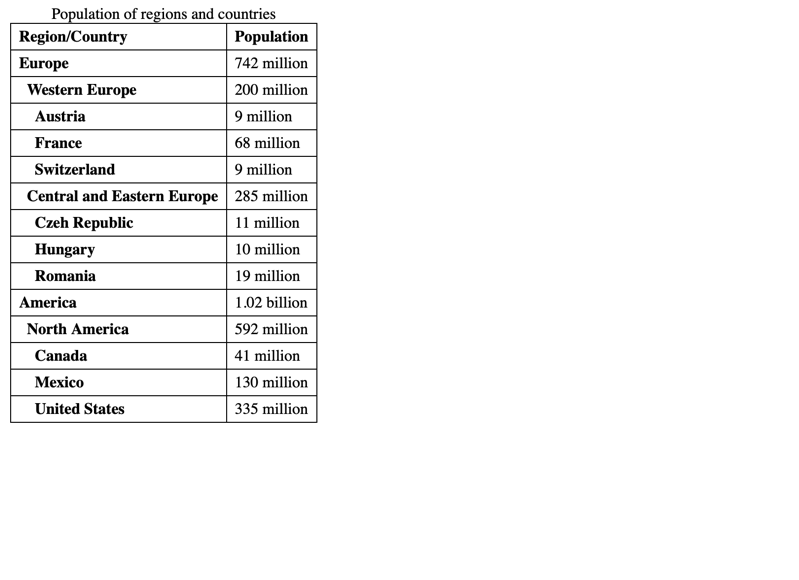
}Tree grid is using role treegrid attribute on table element and aria-level attribute on tr elements to enhance table with level information.
Additional CSS indentation is used in each region/country cell to visualize the current level.
The table reamins simple, there is no empty cell and the implementation is also easy as the level information comes from the data structure.
Level information is mentioned for each row and cell (screen readers could be different).